

Overview
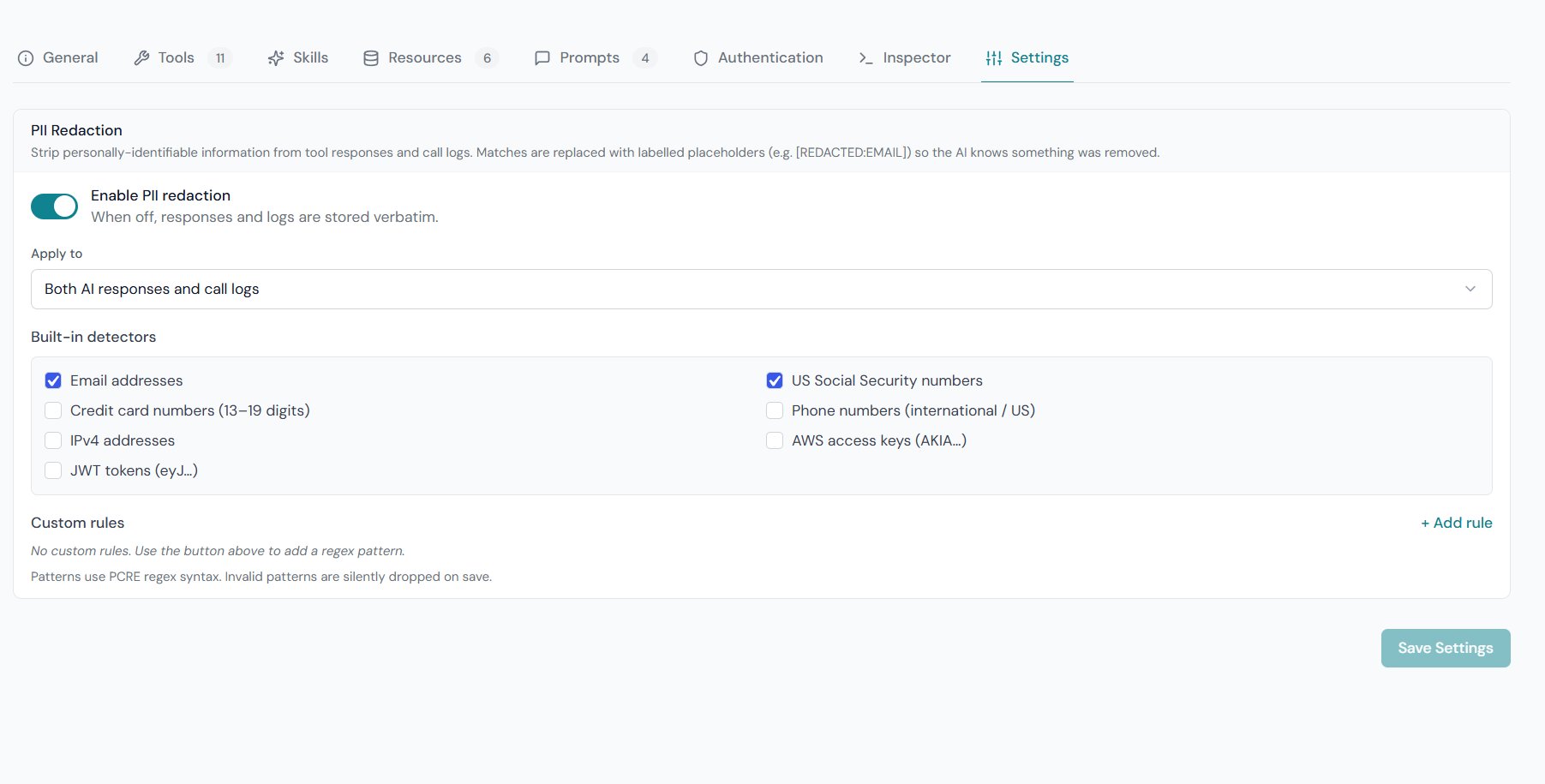
PII redaction runs automatically on every tool call when enabled. It scans the API response for sensitive patterns and replaces matches with labelled placeholders — for example[email protected] becomes [REDACTED:EMAIL] — before the data is sent to the AI client and/or stored in the call log.
Redaction is configured per server and applies to all tools on that server.
Where to Configure It
Open GetMCP → Servers → {Your Server} → Settings tab → PII Redaction section.- Enable PII Redaction — toggle on.
- Scope — choose where redaction is applied.
- Presets — check the built-in patterns to activate.
- Custom Rules — add your own regex patterns (optional).
Redaction Scope
Log only is useful when you need the AI to see full data (e.g. an email tool that must read addresses) but don’t want raw PII in your audit trail.
Built-in Presets
Enable only the presets you need — each active preset adds a small regex cost per field in the response.
Custom Rules
Add your own patterns for data that doesn’t match any built-in preset. Each custom rule has:
Example — UK National Insurance numbers:
![Custom rules row with the UK National Insurance label, regex pattern, and [REDACTED:NIN] replacement](https://mintcdn.com/infiwebs/T4GOYBfEXkTRWAE5/images/pii-custom-rule.png?fit=max&auto=format&n=T4GOYBfEXkTRWAE5&q=85&s=b7a4cc4abd6eb9d21371d5bf0839a73d)
How It Works
Redaction happens after JMESPath/JSONPath extraction but before the data is sent to the AI client or written to the database:- Each active preset and custom rule is applied in order.
- All matches within the string are replaced with the configured placeholder.
- Strings longer than 1 MB are skipped (to avoid PCRE timeouts on huge payloads).
Placeholder Labels in AI Responses
Matches are replaced with named labels (e.g.[REDACTED:EMAIL]) rather than blanked entirely. This lets the AI:
- Know that a field existed but was redacted
- Ask the user to provide the value if needed
- Reason about the response without silently missing data
“I found 3 orders for customer [REDACTED:EMAIL]. Would you like me to look up more details?”
Log Storage
When scope includes logs, redaction is applied to both:- Arguments — the input the AI sent to the tool
- Response data — the upstream API response stored in the log
What PII Redaction Does Not Cover
- Headers — auth headers are masked by a separate allowlist; other headers are not scanned for PII
- Tool configuration — API keys and credentials in tool settings are encrypted at rest, not redacted
- Existing logs — redaction is applied at write time; past logs are not retroactively scanned