

Overview
GetMCP signs every call log entry with an HMAC-SHA256 signature at the moment it is written. If any stored field is later modified — whether accidentally or deliberately — the signature no longer matches, and the verifier flags the row as tampered. This makes the call log effectively append-only: entries can be deleted (and that deletion is itself detectable by gaps), but they cannot be silently edited.How Signing Works
When a call log row is inserted intowp_getmcp_call_logs, GetMCP:
- Assembles a canonical string from the row’s key fields in a fixed order.
- Derives a signing key from WordPress’s
AUTH_KEYconstant using HKDF with the domain stringgetmcp-log-signing-v1. - Computes
HMAC-SHA256(canonical_string, signing_key). - Stores the 64-character hex digest in the
signaturecolumn of the same row.
sodium_memzero) when the PHP sodium extension is available.
Canonical Fields
The canonical string includes the following fields (joined with|):
Fields not included in the canonical form (so adding them later doesn’t break old signatures):
upstream_bytes/delivered_bytesreplay_data
Verifying the Audit Log
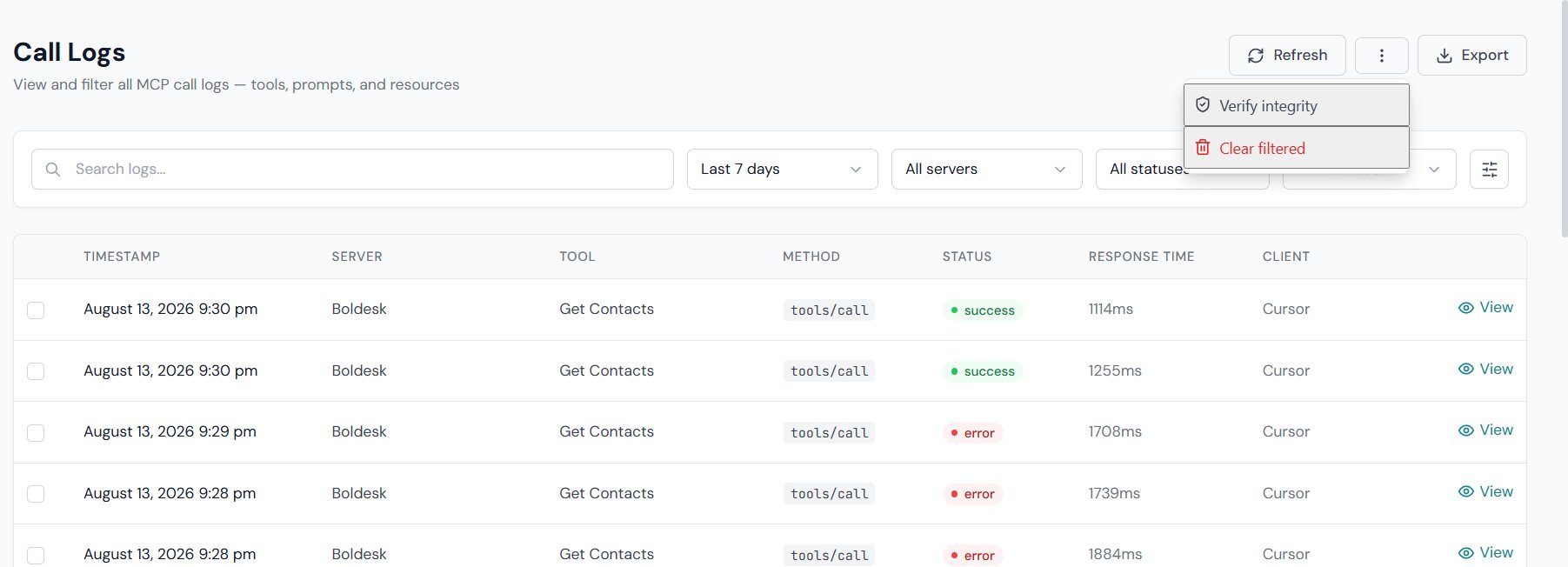
⋮) kebab menu in the toolbar, and choose Verify integrity. GetMCP will:
- Fetch all rows matching your current filter (date range, server, status).
- Recompute the HMAC for each row.
- Compare it to the stored
signature. - Report the outcome as a toast notification.
Verification result states
When every row checks out, the toast is green and readsIntegrity OK — 21 verified. The clauses N legacy (unsigned) and limit reached — narrow filters to scan more are appended only when they apply. If any row fails, the toast turns red instead: Tampering detected: N row(s) failed verification. IDs: … listing the first ten offending IDs.
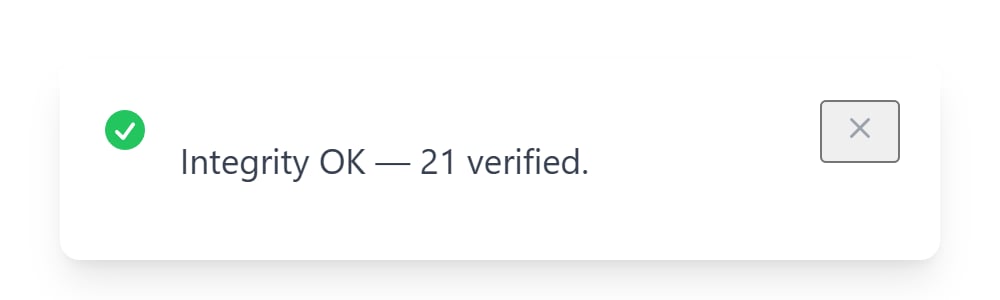
The toast auto-dismisses after a few seconds and the result is not stored. Re-run Verify integrity any time — it recomputes from the stored rows, so the answer is always current.
Rows marked Unsigned (legacy) are not evidence of tampering — they simply pre-date the feature. Only rows with a stored signature can be verified.
Requirements
Security Considerations
Key rotation
The signing key is derived fromAUTH_KEY. If you rotate AUTH_KEY (e.g. after a security incident), all existing signatures will fail verification — they were signed with the old key. This is expected behaviour. After rotation, treat all pre-rotation rows as unsigned legacy rows.
What tampering looks like
A tampered row has a storedsignature value that no longer matches the HMAC of its current field values. The verifier flags it as Tampered and shows the row ID so you can investigate.
Common accidental causes of failed verification:
- Directly editing rows in phpMyAdmin or a MySQL client
- A database migration that modified existing rows
- Restoring a partial DB backup that mixed rows from two different
AUTH_KEYperiods
What the audit log does not prevent
The audit log detects tampering — it does not prevent it. A user with direct MySQL access can delete rows or the entire table. Use database-level access controls and regular off-site backups for defence-in-depth.Daily Automated Verification
A WordPress cron job (getmcp_daily_audit_verify) runs once per day and re-verifies every signed row from the previous calendar day (UTC). If any row’s signature does not match, GetMCP sends an alert via wp_mail() to the notification email configured at GetMCP → Settings → Notifications (falls back to the WordPress admin_email if unset). No email is sent on a clean run.
The same scan can be triggered ad-hoc against any filter range from GetMCP → Logs → More actions → Verify integrity, or via POST /wp-json/getmcp/v1/analytics/audit/verify for scripted full-history sweeps.
A getmcp_audit_tampering_detected action also fires with the list of tampered row IDs, so you can hook into it from a custom plugin (e.g. to forward to a SIEM).