> ## Documentation Index
> Fetch the complete documentation index at: https://docs.getmcp.com/llms.txt
> Use this file to discover all available pages before exploring further.
# Swagger Import
> Import all endpoints from a Swagger 2.0 spec and generate tools automatically.
## Overview
The Swagger Import feature reads a Swagger 2.0 specification and converts every operation into a GetMCP tool. It works the same way as [OpenAPI Import](/docs/guides/openapi-import) but handles the older 2.0 format — including `securityDefinitions`, body parameters with `in: body`, and base URL construction from `schemes + host + basePath`.
For OpenAPI 3.x specs, use [OpenAPI Import](/docs/guides/openapi-import). For Postman collections, use [Postman Import](/docs/guides/postman-import).
## How to Use
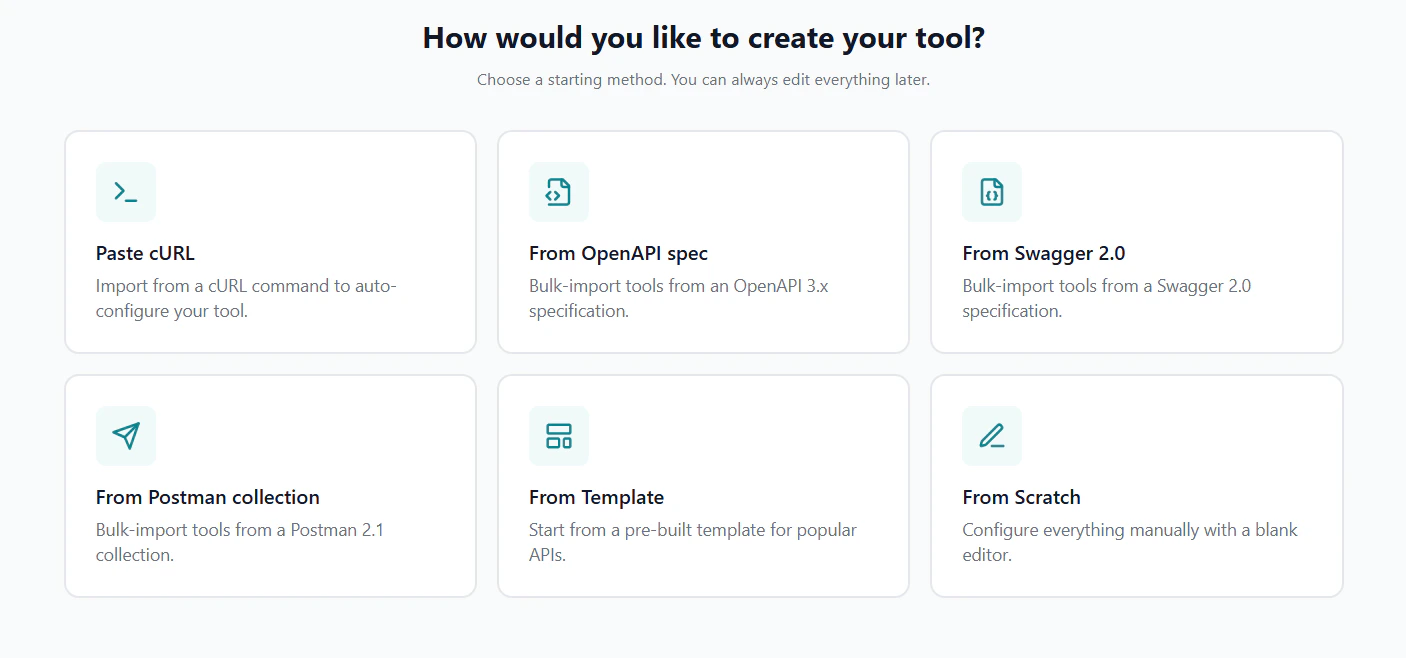 Navigate to your server's **Tools** tab and click the **Import** dropdown, then select **OpenAPI / Swagger**. When you paste or upload a Swagger 2.0 spec (identified by `"swagger": "2.0"`), GetMCP routes it to the Swagger parser automatically.
Choose how to provide the spec — paste text, upload a file, or fetch from a URL.
Navigate to your server's **Tools** tab and click the **Import** dropdown, then select **OpenAPI / Swagger**. When you paste or upload a Swagger 2.0 spec (identified by `"swagger": "2.0"`), GetMCP routes it to the Swagger parser automatically.
Choose how to provide the spec — paste text, upload a file, or fetch from a URL.
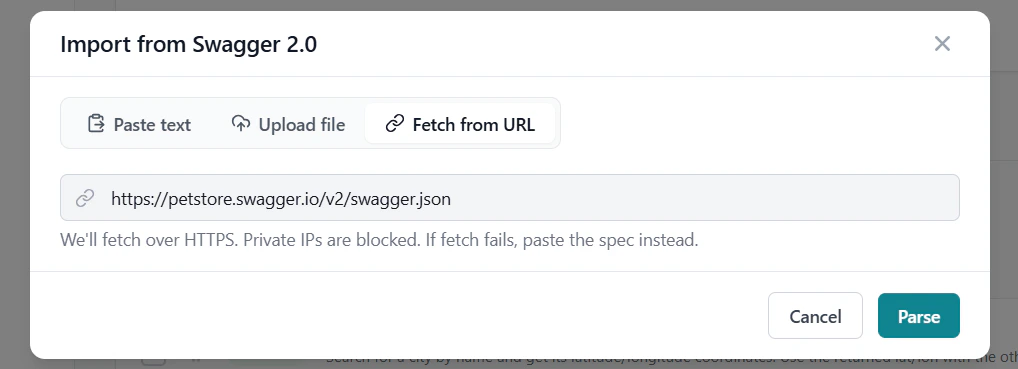 **Paste text** — copy the JSON or YAML spec content and paste it directly.
**Upload file** — drag and drop or select a `.json`, `.yaml`, or `.yml` file (up to 10 MB).
**Fetch from URL** — enter the public URL of your Swagger spec (e.g. `https://api.example.com/swagger.json`).
Then click **Parse**.
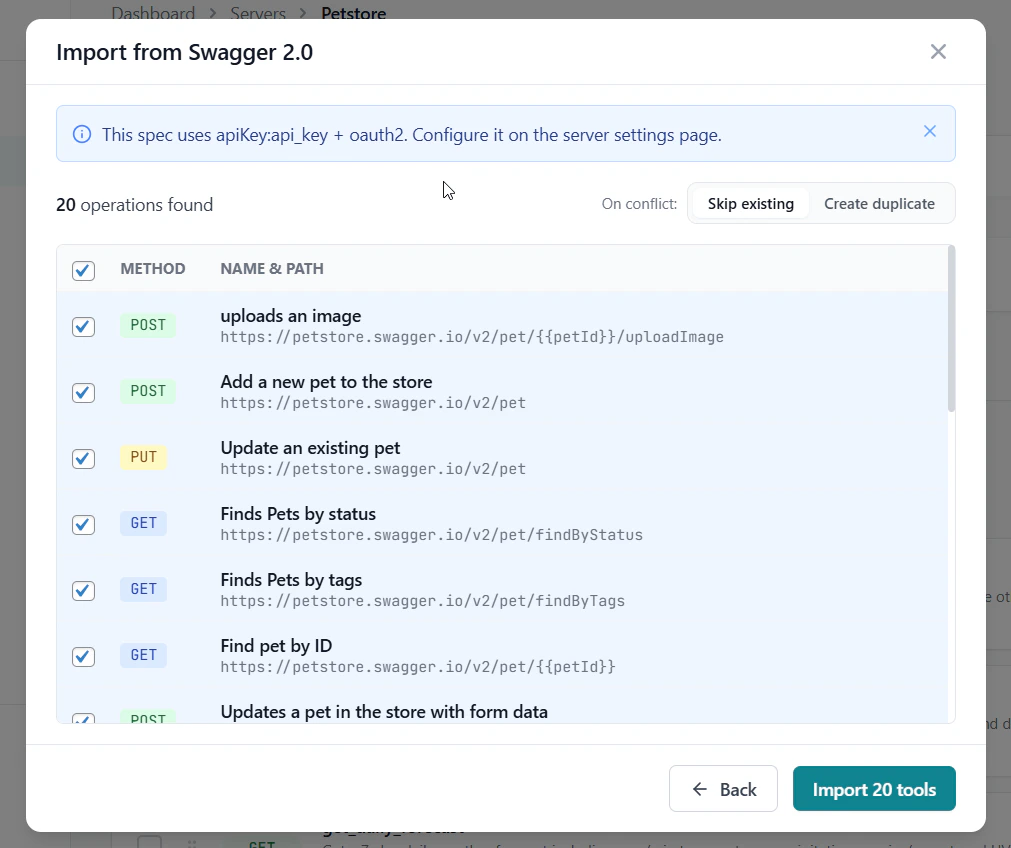
GetMCP shows a preview table of all discovered operations. Check the ones you want to import, set the conflict behavior, and click **Import N tools**.
**Paste text** — copy the JSON or YAML spec content and paste it directly.
**Upload file** — drag and drop or select a `.json`, `.yaml`, or `.yml` file (up to 10 MB).
**Fetch from URL** — enter the public URL of your Swagger spec (e.g. `https://api.example.com/swagger.json`).
Then click **Parse**.
GetMCP shows a preview table of all discovered operations. Check the ones you want to import, set the conflict behavior, and click **Import N tools**.
 The result screen shows created, skipped, and failed tools. Click **Done** to return to the tools list.
## What Gets Imported
| Spec Field | Imported As |
| ------------------------------------- | --------------------------------------- |
| `operationId` / `summary` | Tool name |
| `description` | Tool description |
| HTTP method | HTTP Method |
| `schemes[0] + host + basePath` + path | Endpoint URL |
| Path parameters (`in: path`) | Input parameters mapped to Path |
| Query parameters (`in: query`) | Input parameters mapped to Query String |
| Body parameter (`in: body`, `schema`) | Input parameters mapped to Request Body |
| Form parameters (`in: formData`) | Input parameters mapped to Request Body |
| `required` array | Required flags on parameters |
| Parameter `type` | Parameter type |
## Differences from OpenAPI 3.x
Swagger 2.0 uses an older structure that differs in a few ways:
| Feature | Swagger 2.0 | OpenAPI 3.x |
| ---------------- | --------------------------- | ---------------------------- |
| Base URL | `schemes + host + basePath` | `servers[0].url` |
| Request body | `parameters[in: body]` | `requestBody` |
| Auth definitions | `securityDefinitions` | `components.securitySchemes` |
| Model references | `#/definitions/...` | `#/components/schemas/...` |
GetMCP handles all of these differences automatically.
## Tips
Many older APIs and API management platforms (Kong, AWS API Gateway, Azure APIM) still publish Swagger 2.0 specs. Check the developer portal for a link to `swagger.json` or `swagger.yaml`.
If you get an "unsupported version" error when using OpenAPI Import, switch to Swagger Import. The parser checks the `swagger` vs `openapi` version field and routes accordingly.
The result screen shows created, skipped, and failed tools. Click **Done** to return to the tools list.
## What Gets Imported
| Spec Field | Imported As |
| ------------------------------------- | --------------------------------------- |
| `operationId` / `summary` | Tool name |
| `description` | Tool description |
| HTTP method | HTTP Method |
| `schemes[0] + host + basePath` + path | Endpoint URL |
| Path parameters (`in: path`) | Input parameters mapped to Path |
| Query parameters (`in: query`) | Input parameters mapped to Query String |
| Body parameter (`in: body`, `schema`) | Input parameters mapped to Request Body |
| Form parameters (`in: formData`) | Input parameters mapped to Request Body |
| `required` array | Required flags on parameters |
| Parameter `type` | Parameter type |
## Differences from OpenAPI 3.x
Swagger 2.0 uses an older structure that differs in a few ways:
| Feature | Swagger 2.0 | OpenAPI 3.x |
| ---------------- | --------------------------- | ---------------------------- |
| Base URL | `schemes + host + basePath` | `servers[0].url` |
| Request body | `parameters[in: body]` | `requestBody` |
| Auth definitions | `securityDefinitions` | `components.securitySchemes` |
| Model references | `#/definitions/...` | `#/components/schemas/...` |
GetMCP handles all of these differences automatically.
## Tips
Many older APIs and API management platforms (Kong, AWS API Gateway, Azure APIM) still publish Swagger 2.0 specs. Check the developer portal for a link to `swagger.json` or `swagger.yaml`.
If you get an "unsupported version" error when using OpenAPI Import, switch to Swagger Import. The parser checks the `swagger` vs `openapi` version field and routes accordingly.