> ## Documentation Index
> Fetch the complete documentation index at: https://docs.getmcp.com/llms.txt
> Use this file to discover all available pages before exploring further.
# Prompts
> Prompts are reusable prompt templates with typed arguments exposed via the MCP protocol.
## What is a Prompt?
Prompts in GetMCP are reusable prompt templates that AI clients can retrieve and use via the MCP `prompts/get` method. They let you define structured instructions, system prompts, or workflow templates that AI clients can populate with runtime arguments.
Unlike tools (which call external APIs) or resources (which provide data), prompts provide **instruction templates** that guide how the AI should behave or structure its output.
## Use Cases
* **Standardized system prompts**: Define how the AI should introduce itself or behave in a specific context
* **Workflow templates**: Multi-step instructions for complex tasks (e.g., "Write a product description given these fields")
* **Format instructions**: Tell the AI how to format its output for a specific use case
* **Domain-specific prompts**: Context-rich instructions for specialized domains (legal, medical, technical)
## Prompt Properties
| Property | Description |
| -------------------- | ------------------------------------------------------------------- |
| **Name** | Machine-readable identifier (e.g., `write_product_description`) |
| **Description** | What this prompt does; used by AI clients for discovery |
| **Arguments** | Typed parameters the AI must/can provide when requesting the prompt |
| **Template Content** | The prompt text with `{{argument_name}}` placeholders |
## Prompt Arguments
Each prompt can define typed arguments with the following properties:
| Property | Type | Description |
| ------------- | ------- | ------------------------------------- |
| `name` | string | Argument identifier |
| `description` | string | What this argument is for |
| `required` | boolean | Whether the argument must be provided |
Example arguments for a `write_product_description` prompt:
```json theme={null}
[
{
"name": "product_name",
"description": "The name of the product",
"required": true
},
{
"name": "key_features",
"description": "Comma-separated list of key features",
"required": true
},
{
"name": "tone",
"description": "Writing tone: professional, casual, or enthusiastic",
"required": false
}
]
```
## Template Content
The template is the prompt text with `{{argument_name}}` placeholders that get replaced with the actual values when the prompt is retrieved:
```markdown theme={null}
You are a product copywriter. Write a compelling product description for:
**Product**: {{product_name}}
**Key Features**:
{{key_features}}
**Tone**: {{tone}}
Guidelines:
- Keep it under 150 words
- Highlight the most important feature first
- End with a clear call to action
- Use {{tone}} language throughout
```
## Creating a Prompt
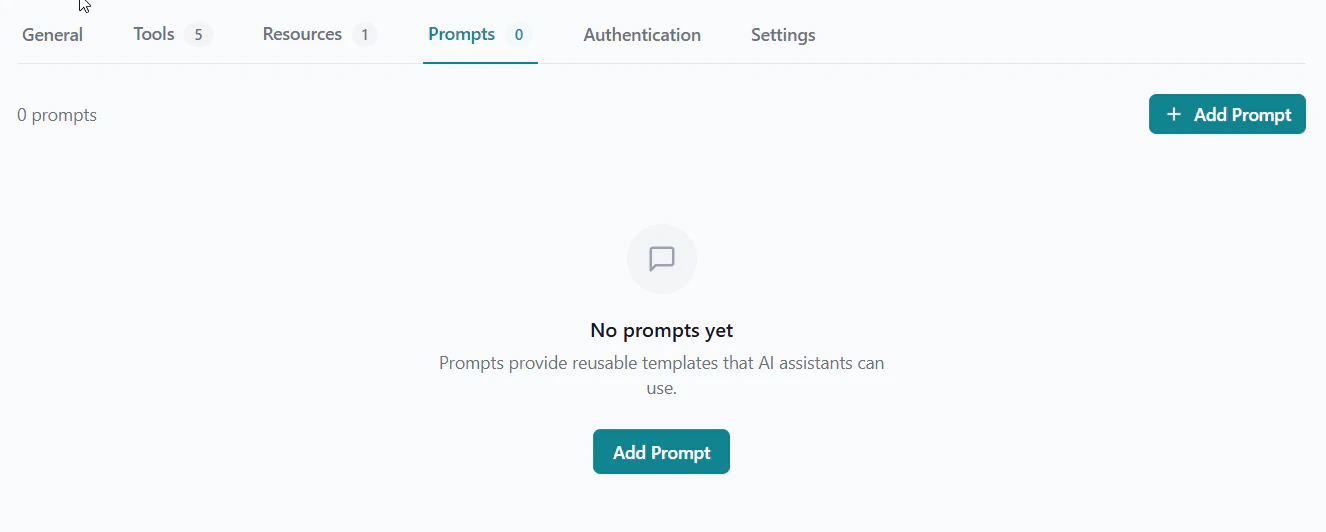
Inside a server, click the **Prompts** tab.
Click **Add Prompt** to open the prompt editor.
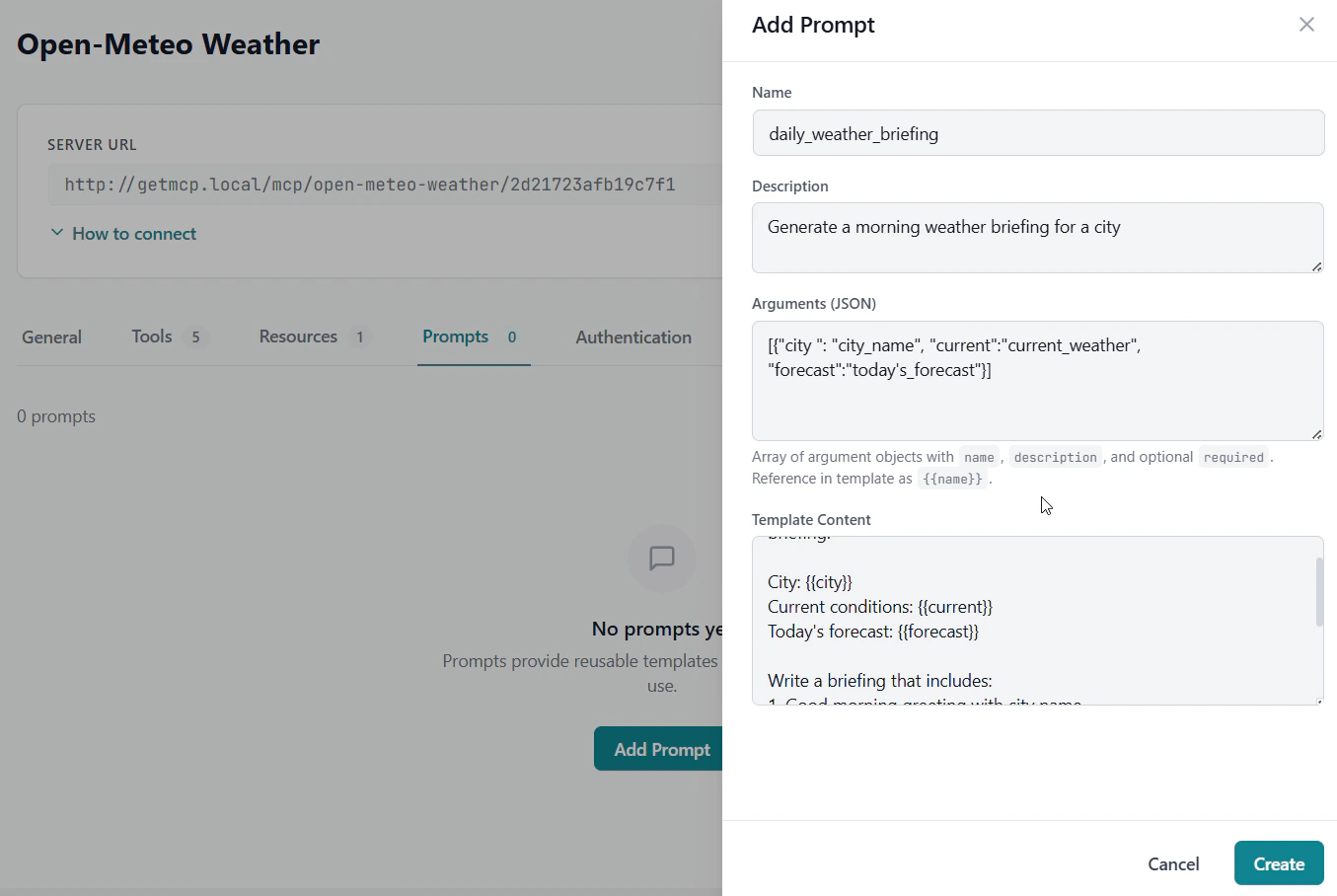
 Enter a machine-readable name and a clear description.
Add arguments using the argument editor. Specify which are required.
Write the template content using `{{argument_name}}` placeholders.
Click **Save**. The prompt is now available via `prompts/list` and `prompts/get`.
Enter a machine-readable name and a clear description.
Add arguments using the argument editor. Specify which are required.
Write the template content using `{{argument_name}}` placeholders.
Click **Save**. The prompt is now available via `prompts/list` and `prompts/get`.
 ## MCP Protocol
Prompts integrate with the standard MCP protocol methods:
* **`prompts/list`** — Returns all prompts for the server (name, description, arguments schema)
* **`prompts/get`** — Returns the rendered prompt content with provided argument values substituted
When an AI client calls `prompts/get`, it passes the argument values and receives back the fully rendered prompt text ready to use.
## MCP Protocol
Prompts integrate with the standard MCP protocol methods:
* **`prompts/list`** — Returns all prompts for the server (name, description, arguments schema)
* **`prompts/get`** — Returns the rendered prompt content with provided argument values substituted
When an AI client calls `prompts/get`, it passes the argument values and receives back the fully rendered prompt text ready to use.