> ## Documentation Index
> Fetch the complete documentation index at: https://docs.getmcp.com/llms.txt
> Use this file to discover all available pages before exploring further.
# API Reference
> GetMCP REST API reference — manage servers, tools, resources, prompts, and analytics programmatically.
## Base URL
All admin REST API endpoints are under the GetMCP namespace:
```
https://yoursite.com/wp-json/getmcp/v1
```
Replace `yoursite.com` with the domain of the WordPress site where GetMCP is installed.
## Authentication
The GetMCP admin API uses API key authentication. Every request must include your API key in the `Authorization` header.
```
Authorization: Bearer gmcp_your_api_key_here
```
### Generating Your API Key
In your WordPress admin, navigate to **GetMCP > Settings**.
Click the **API Keys** tab in the Settings page.
Click **Generate New Key**. Your key will be displayed once — copy it immediately and store it securely.
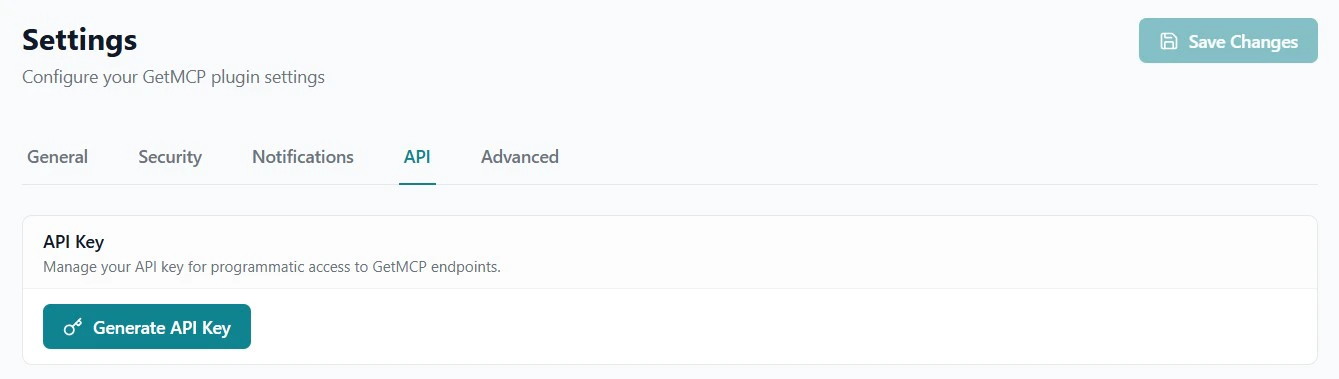 Your API key is shown only once at generation time. Store it in a secure location such as an environment variable or secrets manager. If you lose it, generate a new one — this immediately revokes the old key.
### Key Format
GetMCP API keys use 32-character hex string:
```
a1b2c3d4e5f6a1b2c3d4e5f6a1b2c3d4
```
### Example Request
```bash theme={null}
curl -H "Authorization: Bearer getmcp_api_key_here" \
"https://yoursite.com/wp-json/getmcp/v1/servers"
```
## Response Format
All responses are JSON. Successful list endpoints return an array. Single-item endpoints return an object.
Pagination metadata is returned in response headers:
* `X-WP-Total` — Total number of items
* `X-WP-TotalPages` — Total number of pages
## Error Responses
Errors follow this format:
```json theme={null}
{
"code": "getmcp_not_found",
"message": "Server not found.",
"data": {
"status": 404
}
}
```
### Common Error Codes
| Code | HTTP Status | Description |
| ----------------------- | ----------- | ---------------------------- |
| `rest_forbidden` | 403 | Invalid or missing API key |
| `getmcp_not_found` | 404 | Resource not found |
| `getmcp_create_failed` | 500 | Failed to create resource |
| `getmcp_update_failed` | 500 | Failed to update resource |
| `getmcp_delete_failed` | 500 | Failed to delete resource |
| `getmcp_missing_curl` | 400 | cURL import: missing command |
| `getmcp_invalid_params` | 400 | Invalid parameters |
## Two URL Spaces
GetMCP has two distinct URL spaces — do not confuse them:
| Purpose | Base URL | Auth |
| ------------------------------------------ | ----------------------------------------- | ------------------- |
| **MCP Protocol** (AI clients connect here) | `https://yoursite.com/mcp/{slug}/{id}` | MCP API key or none |
| **Admin REST API** (manage configuration) | `https://yoursite.com/wp-json/getmcp/v1/` | GetMCP API key |
This reference covers the **Admin REST API**. For the MCP Protocol endpoints, see [MCP Protocol Reference](/api-reference/mcp-protocol/overview).
Your API key is shown only once at generation time. Store it in a secure location such as an environment variable or secrets manager. If you lose it, generate a new one — this immediately revokes the old key.
### Key Format
GetMCP API keys use 32-character hex string:
```
a1b2c3d4e5f6a1b2c3d4e5f6a1b2c3d4
```
### Example Request
```bash theme={null}
curl -H "Authorization: Bearer getmcp_api_key_here" \
"https://yoursite.com/wp-json/getmcp/v1/servers"
```
## Response Format
All responses are JSON. Successful list endpoints return an array. Single-item endpoints return an object.
Pagination metadata is returned in response headers:
* `X-WP-Total` — Total number of items
* `X-WP-TotalPages` — Total number of pages
## Error Responses
Errors follow this format:
```json theme={null}
{
"code": "getmcp_not_found",
"message": "Server not found.",
"data": {
"status": 404
}
}
```
### Common Error Codes
| Code | HTTP Status | Description |
| ----------------------- | ----------- | ---------------------------- |
| `rest_forbidden` | 403 | Invalid or missing API key |
| `getmcp_not_found` | 404 | Resource not found |
| `getmcp_create_failed` | 500 | Failed to create resource |
| `getmcp_update_failed` | 500 | Failed to update resource |
| `getmcp_delete_failed` | 500 | Failed to delete resource |
| `getmcp_missing_curl` | 400 | cURL import: missing command |
| `getmcp_invalid_params` | 400 | Invalid parameters |
## Two URL Spaces
GetMCP has two distinct URL spaces — do not confuse them:
| Purpose | Base URL | Auth |
| ------------------------------------------ | ----------------------------------------- | ------------------- |
| **MCP Protocol** (AI clients connect here) | `https://yoursite.com/mcp/{slug}/{id}` | MCP API key or none |
| **Admin REST API** (manage configuration) | `https://yoursite.com/wp-json/getmcp/v1/` | GetMCP API key |
This reference covers the **Admin REST API**. For the MCP Protocol endpoints, see [MCP Protocol Reference](/api-reference/mcp-protocol/overview).